---
title: How to Add a New Neighborhood Place in the Resi App
description: How to add a new Neighborhood place to your website in the Resi app.
---
[Skip to content](https://support.getresi.com/how-to-add-a-new-neighborhood-place-in-the-resi-app-#main-content)
[](https://support.getresi.com/?hsLang=en)
Open main navigation
Close main navigation
- [Contact us](https://team.getresi.com/support/#/tickets/new)
[Contact us](https://team.getresi.com/support/#/tickets/new)
Hi, How Can We Help?
- There are no suggestions because the search field is empty.
1. [Home](https://support.getresi.com/?hsLang=en)
2. [Neighborhood](https://support.getresi.com/neighborhood?hsLang=en)
3. [Points of Interest](https://support.getresi.com/neighborhood?hsLang=en#points-of-interest)
# How to Add a New Neighborhood Place in the Resi App
Adding a new neighborhood place in the Resi App will help you keep your property’s neighborhood details accurate and engaging for residents and prospects. Follow these steps to customize your Points of Interest (POIs):
### Instructions:
1. Click the **"Neighborhood"** tab.
2. Click the **plus (+)** button to add a new neighborhood place.
3. Enter the **place name, address & category**
4. Click ***Save*** to add the place to your list.
### Important Sync Notes:
- **Using the Google Sync Button:** This feature automatically populates key POIs near your property’s address by pulling data directly from Google. However, **syncing will overwrite any custom edits** to your POI list, so use this function carefully.
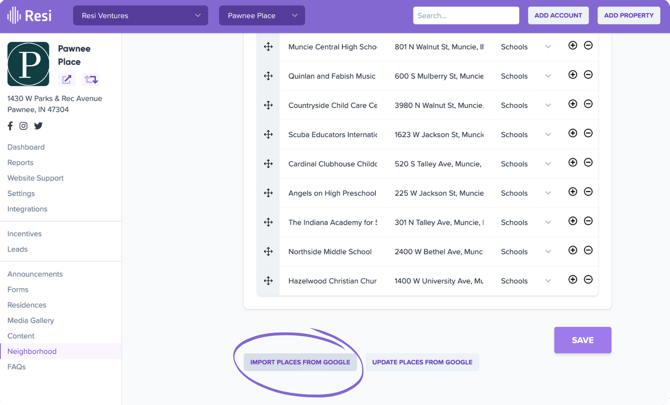
- **Customizing Your List:** While you cannot add new POI categories, you can freely **add or delete individual POIs** to tailor the list to your needs.
- **Avoid Re-Syncing After Custom Edits:** Once you've customized your POI list, avoid manually re-syncing to retain your changes.
### **Step-By-Step Guide**
---
### Related FAQs
1. #### **What happens when I click the Google Sync button?**
The sync pulls POIs near your property’s location and replaces any custom edits made to your list.
2. #### **Can I add my own POI categories?**
No, POI categories cannot be added or changed, but you can manually add or delete individual places from the list.
3. #### **How do I retain custom edits?**
Avoid re-syncing with Google after making manual changes to your POI list.
4. #### **Why aren’t all nearby places showing up?**
The Google Sync may prioritize popular or relevant POIs. You can manually add missing places if needed.
---
### Related Articles
- [How to Add an FAQ to my Website](https://support.getresi.com/how-to-add-a-faq-to-my-website?hsLang=en)
- [Settings & Account](https://support.getresi.com/settings-account?hsLang=en#main-content)
- [Users](https://support.getresi.com/settings-account?hsLang=en#users)
- [Office Hours](https://support.getresi.com/settings-account?hsLang=en#office-hours)
- [Social Media](https://support.getresi.com/settings-account?hsLang=en#social-media)
- [Password Reset](https://support.getresi.com/settings-account?hsLang=en#password-reset)
- [Announcements](https://support.getresi.com/announcements?hsLang=en#main-content)
- [Creating & Publishing](https://support.getresi.com/announcements?hsLang=en#creating-publishing)
- [Scheduling](https://support.getresi.com/announcements?hsLang=en#scheduling)
- [Announcement FAQs](https://support.getresi.com/announcements?hsLang=en#announcement-faqs)
- [Media Gallery](https://support.getresi.com/media-gallery?hsLang=en#main-content)
- [Uploading & Reordering Images](https://support.getresi.com/media-gallery?hsLang=en#uploading-reordering-images)
- [Virtual Tours](https://support.getresi.com/media-gallery?hsLang=en#virtual-tours)
- [Floor Plans](https://support.getresi.com/floor-plans?hsLang=en)
- [Leads & Data](https://support.getresi.com/leads-data?hsLang=en#main-content)
- [Leads](https://support.getresi.com/leads-data?hsLang=en#leads)
- [Data Syncing](https://support.getresi.com/leads-data?hsLang=en#data-syncing)
- [Property FAQs](https://support.getresi.com/property-faqs?hsLang=en)
- [Neighborhood](https://support.getresi.com/neighborhood?hsLang=en#main-content)
- [Points of Interest](https://support.getresi.com/neighborhood?hsLang=en#points-of-interest)
- [Integrations](https://support.getresi.com/integrations?hsLang=en)
- [Support & Guides](https://support.getresi.com/support-guides?hsLang=en#main-content)
- [Website Feedback](https://support.getresi.com/support-guides?hsLang=en#website-feedback)
- [Forms](https://support.getresi.com/support-guides?hsLang=en#forms)
- [Guides](https://support.getresi.com/support-guides?hsLang=en#guides)
- [Support Tickets](https://support.getresi.com/support-guides?hsLang=en#support-tickets)
- [Blogs](https://support.getresi.com/support-guides?hsLang=en#blogs)
- [Onboarding](https://support.getresi.com/support-guides?hsLang=en#onboarding)
- [Resi V2](https://support.getresi.com/resi-v2?hsLang=en#main-content)
- [Getting Started](https://support.getresi.com/resi-v2?hsLang=en#getting-started)
- [Content Management](https://support.getresi.com/resi-v2?hsLang=en#content-management)
- [Property Data & Settings](https://support.getresi.com/resi-v2?hsLang=en#property-data-settings)
- [Media & Galleries](https://support.getresi.com/resi-v2?hsLang=en#media-galleries)
- [Website Builder](https://support.getresi.com/resi-v2?hsLang=en#website-builder)
[](https://getresi.com)
[mailto:support@getresi.com](mailto:support@getresi.com)
Copyright © 2025, Resi