---
title: How to Reorder Images in the Media Gallery
description: Reorder images in Resi’s Media Gallery with drag-and-drop. Save changes and refresh content if needed. Learn more in our photo management guides.
---
[Skip to content](https://support.getresi.com/how-to-reorder-images-in-the-media-gallery#main-content)
[](https://support.getresi.com/?hsLang=en)
- [Resi App](https://v2.getresi.com/)
- [User Guides](https://docs.getresi.com/)
Open main navigation
Close main navigation
- [Resi App](https://v2.getresi.com/)
- [User Guides](https://docs.getresi.com/)
- [Contact us](https://team.getresi.com/support/#/tickets/new)
[Contact us](https://team.getresi.com/support/#/tickets/new)
Hi, How Can We Help?
- There are no suggestions because the search field is empty.
1. [Home](https://support.getresi.com/?hsLang=en)
2. [Media Gallery](https://support.getresi.com/media-gallery?hsLang=en)
3. [Uploading & Reordering Images](https://support.getresi.com/media-gallery?hsLang=en#uploading-reordering-images)
# How to Reorder Images in the Media Gallery
### Reordering Images in the Media Gallery
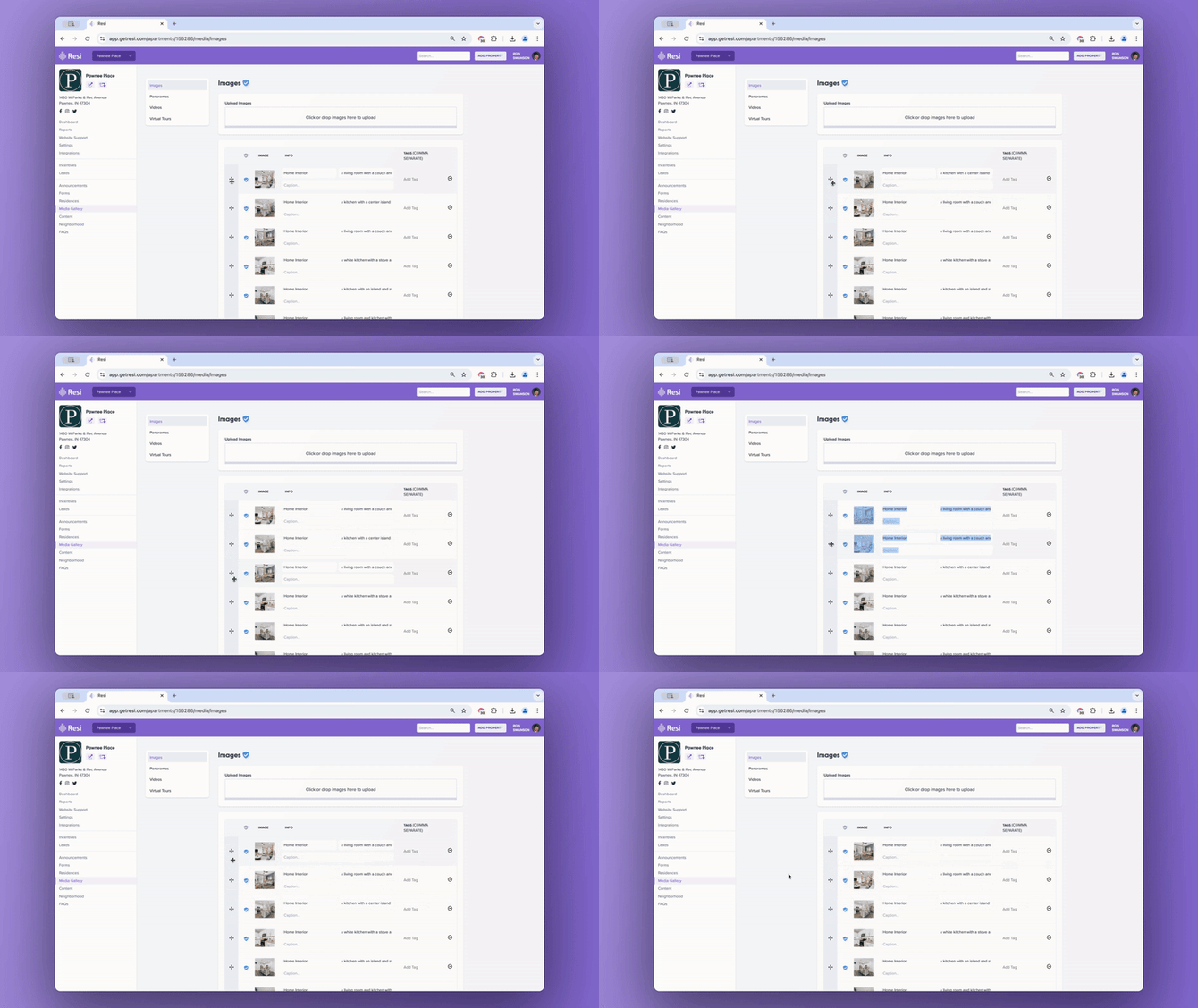
Reordering images in Resi’s Media Gallery is quick with drag-and-drop functionality:
1. #### **Access the Media Gallery**
Open the Media Gallery from the Resi App dashboard.
2. #### **Click and Drag to Reorder Images**
Click and hold the image you want to move, then drag it to the desired position.
3. #### **Save Changes**
After arranging your images, click **Save** to confirm the new order.
### Important Note for PMS Users
Some Property Management Systems (PMS), like **Entrata**, may require updates on the PMS end in addition to the Resi App. If the PMS isn’t updated, it may override the changes you’ve made in the Resi App.
To avoid this:
1. Confirm whether your PMS needs to be updated for image reordering.
2. If applicable, update the image order directly in your PMS.
3. Ensure both systems are synced to maintain the correct order.
### Troubleshooting
If changes don’t show immediately:
- [**Clear Cache**:](https://support.getresi.com/clearing-your-cache-to-view-website-updates?hsLang=en) Refresh your browser or clear the cache.
- **Sync and Refresh**: Use the ['sync and refresh'](https://support.getresi.com/how-to-manually-sync-pms-data-in-the-resi-app?hsLang=en) button in the Resi dashboard to push updates.
### **Example**
---
### **Related FAQs**
1. #### **Can I reorder images across multiple galleries at once?**
No, images must be reordered within each specific gallery separately.
2. #### **What if my image order doesn’t save?**
Edits to this section of the Resi App save automatically. If the changes still don’t appear, [clear your cache](https://support.getresi.com/clearing-your-cache-to-view-website-updates?hsLang=en) or use the [**'sync and refresh'** button](https://support.getresi.com/how-to-manually-sync-pms-data-in-the-resi-app?hsLang=en).
3. #### **Can I use drag-and-drop to reorder images?**
Yes, just drag images to rearrange them in the Media Gallery.
---
### **Related Articles**
1. [How to Upload New Photos to the Media Gallery](https://support.getresi.com/how-to-upload-new-photos-to-the-media-gallery?hsLang=en)
2. [How to Delete Images from the Media Gallery](https://support.getresi.com/how-to-upload-new-photos-to-the-media-gallery?hsLang=en)
3. [Adding or Removing a Virtual Tour](https://support.getresi.com/how-to-add/remove-a-virtual-tour-to-the-media-gallery-in-the-resi-app?hsLang=en)
- [Settings & Account](https://support.getresi.com/settings-account?hsLang=en#main-content)
- [Users](https://support.getresi.com/settings-account?hsLang=en#users)
- [Office Hours](https://support.getresi.com/settings-account?hsLang=en#office-hours)
- [Social Media](https://support.getresi.com/settings-account?hsLang=en#social-media)
- [Password Reset](https://support.getresi.com/settings-account?hsLang=en#password-reset)
- [Announcements](https://support.getresi.com/announcements?hsLang=en#main-content)
- [Creating & Publishing](https://support.getresi.com/announcements?hsLang=en#creating-publishing)
- [Scheduling](https://support.getresi.com/announcements?hsLang=en#scheduling)
- [Announcement FAQs](https://support.getresi.com/announcements?hsLang=en#announcement-faqs)
- [Media Gallery](https://support.getresi.com/media-gallery?hsLang=en#main-content)
- [Uploading & Reordering Images](https://support.getresi.com/media-gallery?hsLang=en#uploading-reordering-images)
- [Virtual Tours](https://support.getresi.com/media-gallery?hsLang=en#virtual-tours)
- [Floor Plans](https://support.getresi.com/floor-plans?hsLang=en)
- [Leads & Data](https://support.getresi.com/leads-data?hsLang=en#main-content)
- [Leads](https://support.getresi.com/leads-data?hsLang=en#leads)
- [Data Syncing](https://support.getresi.com/leads-data?hsLang=en#data-syncing)
- [Property FAQs](https://support.getresi.com/property-faqs?hsLang=en)
- [Neighborhood](https://support.getresi.com/neighborhood?hsLang=en#main-content)
- [Points of Interest](https://support.getresi.com/neighborhood?hsLang=en#points-of-interest)
- [Integrations](https://support.getresi.com/integrations?hsLang=en)
- [Support & Guides](https://support.getresi.com/support-guides?hsLang=en#main-content)
- [Website Feedback](https://support.getresi.com/support-guides?hsLang=en#website-feedback)
- [Forms](https://support.getresi.com/support-guides?hsLang=en#forms)
- [Guides](https://support.getresi.com/support-guides?hsLang=en#guides)
- [Support Tickets](https://support.getresi.com/support-guides?hsLang=en#support-tickets)
- [Blogs](https://support.getresi.com/support-guides?hsLang=en#blogs)
- [Onboarding](https://support.getresi.com/support-guides?hsLang=en#onboarding)
- [Resi V2](https://support.getresi.com/resi-v2?hsLang=en#main-content)
- [Getting Started](https://support.getresi.com/resi-v2?hsLang=en#getting-started)
- [Content Management](https://support.getresi.com/resi-v2?hsLang=en#content-management)
- [Property Data & Settings](https://support.getresi.com/resi-v2?hsLang=en#property-data-settings)
- [Media & Galleries](https://support.getresi.com/resi-v2?hsLang=en#media-galleries)
- [Website Builder](https://support.getresi.com/resi-v2?hsLang=en#website-builder)
[](https://getresi.com)
[mailto:support@getresi.com](mailto:support@getresi.com)
Copyright © 2025, Resi